CLER
C++17 DSP flowgraphs for SDRs and embedded systems
Typed channels. Small core. Desktop to bare metal.
What it is
CLER is a modern, batteries-included DSP framework built for AI agents. Smart abstractions keep code and context small, making end-to-end DSP chains straightforward to build. Scheduling, buffers, device support, plots, and tested DSP blocks are included. The same design runs from desktop to bare metal, with a header-only core and optional dependencies.
What it looks like
This example generates two tones, adds them, limits the rate, and plots the result. The BlockRunner list defines the connections.
#include "cler.hpp"
#include "task_policies/cler_desktop_tpolicy.hpp"
#include "desktop_blocks/gui/gui_manager.hpp"
#include "desktop_blocks/math/add.hpp"
#include "desktop_blocks/plots/plot_timeseries.hpp"
#include "desktop_blocks/sources/source_cw.hpp"
#include "desktop_blocks/utils/throttle.hpp"

int main() {
    constexpr size_t sample_rate = 1000;

    cler::GuiManager gui(800, 400, "CLER");
    SourceCWBlock<float> tone_a("Tone A", 1.0f, 1.0f, sample_rate);
    SourceCWBlock<float> tone_b("Tone B", 1.0f, 20.0f, sample_rate);
    AddBlock<float, 2> add("Add");
    ThrottleBlock<float> throttle("Throttle", sample_rate);
    PlotTimeSeriesBlock plot("Plot", {"Sum"}, sample_rate, 3.0f);

    auto graph = cler::make_desktop_flowgraph(
        cler::BlockRunner(&tone_a, &add.in[0]),
        cler::BlockRunner(&tone_b, &add.in[1]),
        cler::BlockRunner(&add, &throttle.in),
        cler::BlockRunner(&throttle, &plot.in[0]),
        cler::BlockRunner(&plot)
    );

    graph.run();
    while (!gui.should_close()) {
        gui.render(graph);
    }
    graph.stop();
}
A runner takes a block first, followed by the downstream channels that receive its outputs. A type mismatch between connected channels is a compile-time error.
Build the core examples
You need CMake 3.16, a C++17 compiler, threads, and pkg-config. This build leaves the GUI and liquid-dsp blocks off.
git clone https://github.com/cariboulabs/cler.git
cd cler
cmake -S . -B build-core \
  -DCLER_BUILD_BLOCKS_GUI=OFF \
  -DCLER_BUILD_BLOCKS_LIQUID=OFF
cmake --build build-core -j4
./build-core/desktop_examples/flowgraph
Continue to the guide for block design, zero-copy channels, scheduler selection, desktop dependencies, and embedded targets.
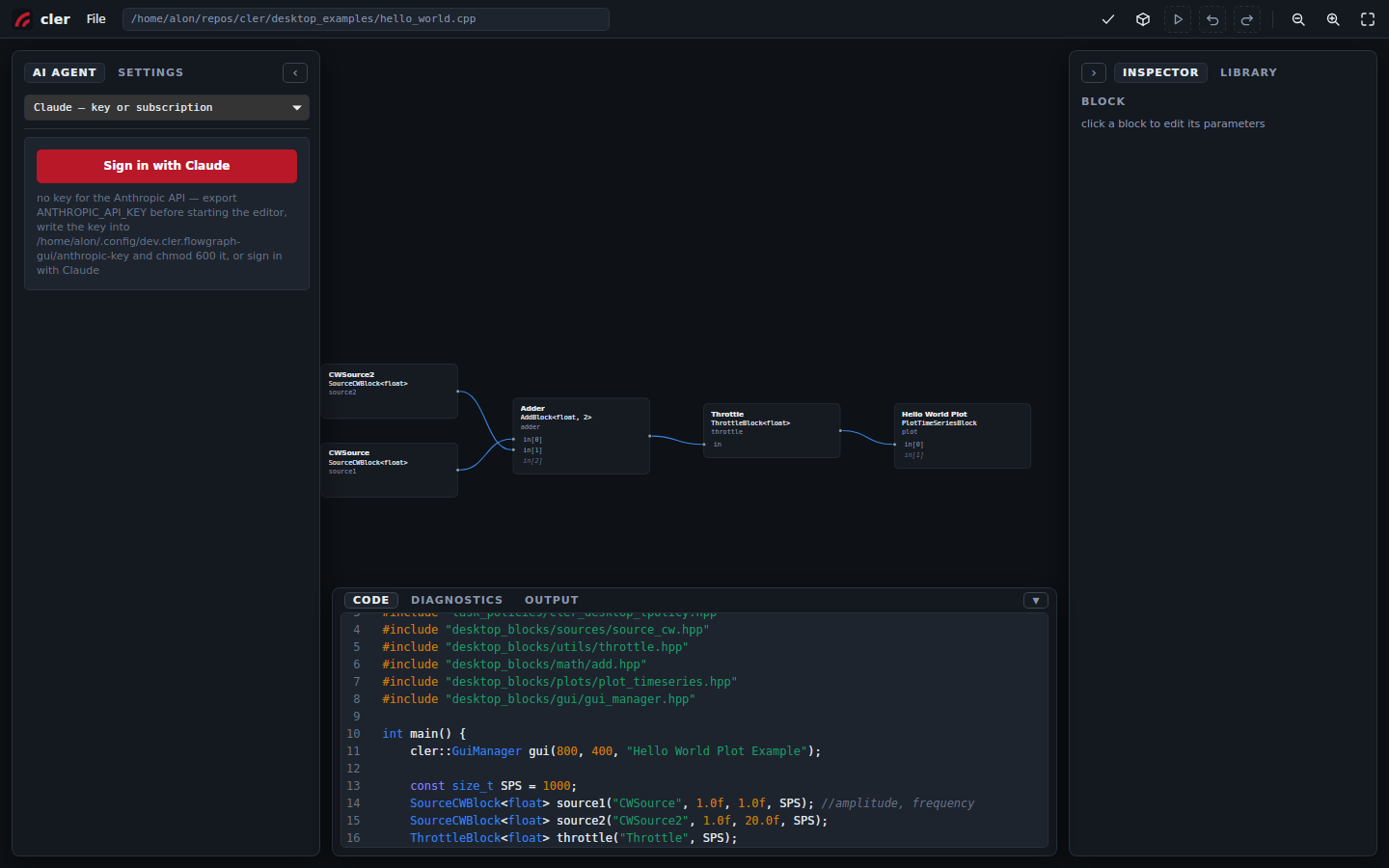
Integrated flowgraph editor
cler-fg is a visual editor for CLER flowgraphs: place blocks, wire them, edit parameters, build, run. There is no generated code and no project file — the canvas is a live view of your C++ source, and every edit lands in that file. Optional, shipped with CLER.
Try it in the browser → Learn about cler-fg →
The browser version is the full editor, including Build and Run via a wasm C++ toolchain (no hardware blocks). The AI agent needs the desktop app.